Documentation
Settings
- Thresholds- These affect the threshold of confidence for the AI. It is essentially a confidence score. Setting the SSN to .8 for example would ask the program to filter the document for SSN's if the confidence score given by the ai is above 80%.
- Output Location- This is where your output will be stored. Hit browse to go to the file location with browse you can set any folder as the output folder
- Logging Location- This is where logs saved in a txt format for ease of use.
- Batch size- Batch size controls how many token sequences (or chunks) the model processes at once during inference or training, affecting speed and memory usage.
- Merge Gap- Merge gap defines the maximum number of characters allowed between adjacent detected fragments for them to be combined into a single merged PII span.
Results Screen
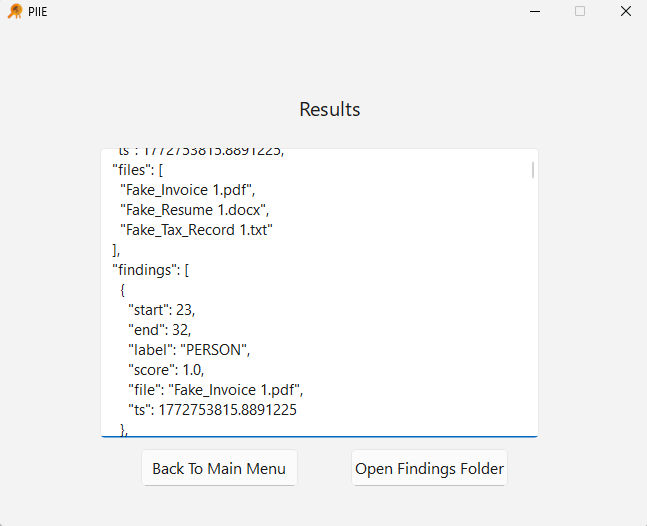
- Files- Shows files scanned
- Findings-
- Start/End- What character number the PII was found at
- Label- What kind of PII was found
- Score- Ranged 0-1 decimal percentage, with 1 being the most confident and 0 having no confidence. You shouldn't have anything 0 unless it is set in the Settings before scanning
- File- What file the PII was found in
- TS- Timestamp wip